The short answer
A webcam can follow your face in three ways. A gimbal or PTZ webcam has motors inside and tracks with its own chip; you buy a new camera, usually $99 to $199 or more. Software auto-framing (built into some laptops and GPU tools) does not move anything: it crops a wide picture and slides the crop around, trading resolution for motion. A motorized mount turns the webcam you already have.
OKO-1 is the third kind, and it is open source: a 3D-printed pan/tilt head with a $6 ESP32-CAM that finds your face on-chip and two MG90S servos that turn your webcam toward you. About $22 in parts, no soldering, no app, no cloud.
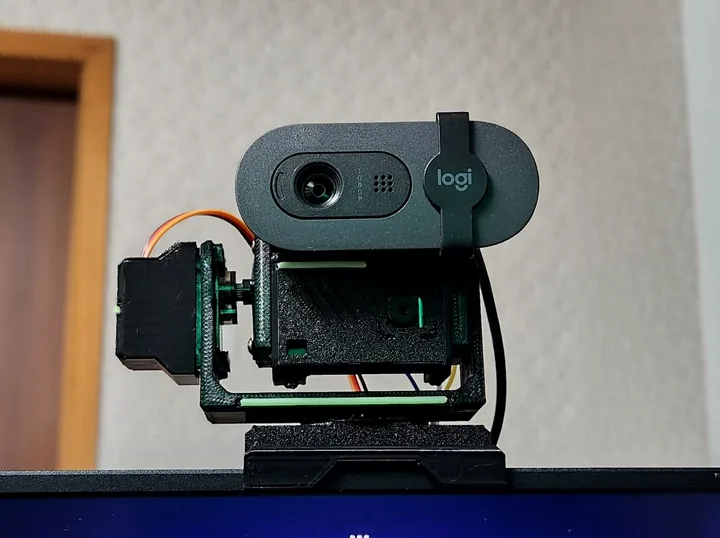
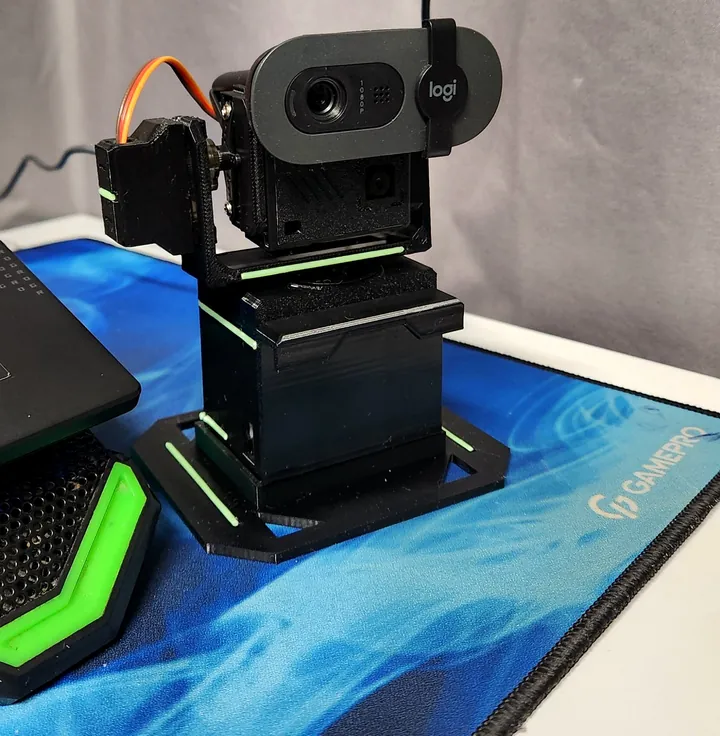
Three ways to stay in frame
| Gimbal / PTZ webcam | Software auto-framing | OKO-1 motorized mount | |
|---|---|---|---|
| How it follows you | Motors inside the camera turn the lens | Crops and pans inside a wide picture | Motors turn your own webcam |
| Keeps full resolution | Yes | No, it zooms into part of the frame | Yes |
| Works with the webcam you own | No, you buy theirs | Only on supported hardware | Yes, any clip-on webcam |
| Range | Wide, motorized | Limited to the original field of view | Pan ±80°, motorized |
| Typical cost | $99 to $199+ | Built in, if your laptop or GPU supports it | ≈$22 in parts |
| Open source | No | No | Yes: CAD, firmware, docs |
Gimbal / PTZ webcam
- How it follows you
- Motors inside the camera turn the lens
- Keeps full resolution
- Yes
- Works with the webcam you own
- No, you buy theirs
- Range
- Wide, motorized
- Typical cost
- $99 to $199+
- Open source
- No
Software auto-framing
- How it follows you
- Crops and pans inside a wide picture
- Keeps full resolution
- No, it zooms into part of the frame
- Works with the webcam you own
- Only on supported hardware
- Range
- Limited to the original field of view
- Typical cost
- Built in, if your laptop or GPU supports it
- Open source
- No
OKO-1 motorized mount
- How it follows you
- Motors turn your own webcam
- Keeps full resolution
- Yes
- Works with the webcam you own
- Yes, any clip-on webcam
- Range
- Pan ±80°, motorized
- Typical cost
- ≈$22 in parts
- Open source
- Yes: CAD, firmware, docs
Gimbal prices are official launch prices in USD (OBSBOT Tiny SE $99, Insta360 Link 2 $199). OKO-1 cost is the parts list on the home page; your webcam is not included because you already own it.
How OKO-1 tracks a face on a $6 chip
The trick is to separate the eye from the camera. Your webcam is only a passenger. A small second camera on the head does the looking, so tracking never depends on your webcam model, its drivers or its software.
- 01See
An OV2640 sensor on the head captures 320 × 240 frames. This is a separate tracking camera, not your webcam.
- 02Detect
Espressif’s esp-dl face detector runs on the ESP32-CAM chip itself, about 7.2 detections per second. After the first lock it searches only a window around your face, which keeps it fast.
- 03Report
Only the face position leaves the camera: a few bytes over two wires (UART at 921 600 baud). No pictures, no radio.
- 04Compensate
Each report is about 80 ms old when it arrives. The main ESP32 keeps a 640 ms history of servo positions, looks up where the head was pointing when that frame was taken, and corrects from there. Delay never turns into overshoot.
- 05Move
A 2° dead zone keeps the head still while you sit still. Bigger offsets become eased moves: about 500 ms to settle, capped at 90°/s, no overshoot.
- 06Rest
Lose the face for 6 seconds and OKO-1 returns to the centre and waits.
No Wi-Fi, no app, no account
The firmware never starts Wi-Fi or Bluetooth. The tracking camera sends nothing but face coordinates over a wire to the main board, and the main board only drives two servos. Your webcam stays plugged into your computer exactly as before, so its video never passes through OKO-1. You can read every line of that firmware on GitHub.
Where a following camera helps
Video calls
Lean back, stand up, reach for a notebook: you stay in the middle of the picture in Zoom, Meet, Teams or Slack.
Teaching and demos
Move between the desk and a whiteboard or a product on the table without asking someone to fix the camera.
Standing desks
Switch between sitting and standing mid-call; tilt follows your height.
Streaming and recording
Talking-head videos and tutorials with a camera that keeps up when you move. Works in OBS like any webcam, because it is your webcam.
What it does not do
- It follows one face at a time. With several people in view it is not a group framing camera.
- Detection needs a visible face and reasonable light. If it cannot find a face for 6 seconds it returns to the centre.
- About 7 detections per second is ideal for calls and teaching, not for fast sports.
- MG90S servos are small and quiet, but not silent: you hear a soft whir when the head moves.
- Designed for light clip-on webcams. Heavy cameras with big mounts are not a fit for micro servos.
Questions people ask
Can I make my existing webcam track my face without buying a new one?
Yes. Mount it on a motorized pan/tilt head that has its own tracking camera, like OKO-1. The webcam keeps working as a normal USB camera, and the head turns it toward you. OKO-1 costs about $22 in parts and is fully open source.
Is software auto-framing the same as a tracking webcam?
No. Software framing crops a wider picture and moves the crop, so it can only follow you inside the original field of view and the image gets softer when it zooms. A motorized mount physically turns the camera and keeps the full resolution.
Does face tracking send my video to the cloud?
Not with OKO-1. Face detection runs on the ESP32-CAM chip, Wi-Fi and Bluetooth are never started, and only face coordinates travel over a wire. Your webcam picture never passes through the device.
Which webcams fit?
Any webcam with a monitor-style clip that fits on the head rib. It was developed with a Logitech Brio 100. Light 1080p and 2K clip-on webcams are the intended range.
How hard is it to build?
One evening, no soldering and no separate programmer. You print one PETG plate, flash two boards from a computer, connect a few Dupont wires and screw it together. The build guide and a copy-paste prompt for Claude walk you through it.
Build yours tonight
Print one plate, flash two boards, connect a few wires. Or paste one prompt and let Claude walk you through it.